Key Rotation Guide for Enhanced Security
Security > Secure Key Manager > Key Rotation Guide for Enhanced Security
This guide explains how to enhance security in production environments by leveraging the key rotation features of Secure Key Manager (SKM).
Note
This guide is intended for current users of the Secure Key Manager (SKM) service. If you are a new user, please refer to the Secure Key Manager Overview first.
Glossary
To help you follow along more easily, please review these key terms first.
| Terms | Description |
|---|---|
| Key rotation | Key rotation is the process of periodically replacing encryption keys with new ones to strengthen security. It is similar to the concept of regularly changing your passwords. |
| Envelope encryption | This is a method of encrypting data in two stages. It provides double protection, much like placing a sensitive document in an envelope and then securing that envelope inside a safe. |
| Data encryption key(DEK) | The key used to encrypt the actual data. It acts as the "envelope" in envelope encryption. |
| Key encryption key(KEK) | The key used to encrypt the DEK. The symmetric key managed by Secure Key Manager plays this role. It acts as the 'vault' in envelope encryption. |
| Key segmentation | A strategy for encrypting data with multiple keys, rather than encrypting all data with a single key. This can be by time of day, by region, by user group, and so on. It's the same principle as not putting all your eggs in one basket. |
Why key rotation is necessary
Prolonged use of encryption keys increases the following security risks:
- Increased risk of key exposure: The longer a key is in use, the higher its risk of being exposed to attackers.
- Cryptanalysis attack risk: The more data encrypted with the same key, the easier it is to infer the key through pattern analysis.
- Expanded impact of security incidents: If a key is compromised, all data encrypted with that key is at risk.
Secure Key Manager's key rotation feature allows you to renew only the key value without changing the key ID, increasing security without modifying your application code.
Create a Key Rotation Strategy
Your key rotation strategy should be based on the business impact and security requirements of your service.
Considerations
- Service impact: Develop a strategy to minimize the impact of key rotation on services.
- Operational complexity: Consider the range of possible operations, such as setting up automatic rotation cycles and re-encryption strategies.
Note
You can set the auto-rotation interval to as little as 30 days.
Key Rotation in an Envelope Encryption Environment
Envelope encryption is an encryption pattern that can efficiently implement key rotation.
What is envelope encryption?
Envelope encryption is a method of encrypting data through a two-step process. Let's compare how it differs from traditional encryption methods.
Common encryption method
[User data] → [Encrypt directly with encryption key] → [Encrypted data] (DB storage)The problem with this approach is that if the key is compromised, all data is at risk, and changing the key requires re-encrypting all data.
Envelope encryption method
[User Data] → [Encrypt with DEK] → [Encrypted Data]   (Save to DB)
[DEK] → [Encrypt with KEK] → [DEK ciphertext]            (KEK stored in Secure Key Manager, DEK ciphertext stored in DB or Secure Key Manager)
Envelope encryption offers the following security advantages over regular encryption methods:
- Minimize key exposure: KEKs are stored securely in Secure Key Manager and are not exposed as your code.
- Centralize key management: Critical KEKs are managed centrally in Secure Key Manager, and DEKs can be generated differently for each piece of data to minimize the scope of compromise.
- Enhanced audit trail: Secure Key Manager logs all KEK usage, making it easy to audit trail key usage.
Understanding with Analogies
Think about the process of periodically updating the access code for your home’s smart lock.
- Traditional method: Direct passcode (Key) on the front door (Data) → Changing the passcode requires resetting all 100 units.
- Envelope method: Front door (Data) locked with a fixed key (DEK), with that key stored in a lockbox secured by a passcode (KEK) → Security updates only require changing the lockbox passcode.
Why Envelope Encryption Favors Key Rotation
Problems with traditional single-key encryption
- If you encrypt all your data directly with a single key, you'll need to re-encrypt the entire data when you rotate the key.
- With 1 million records, key rotation requires re-encrypting all 1 million entries.
Workarounds for Envelope Encryption
- Two-level encryption structure: Data is encrypted with a data encryption key (DEK), and only the DEK is encrypted with a key encryption key (KEK).
- Advantage of KEK rotation: Even when you rotate the KEK, the actual user data remains the same, and you only need to process the DEK ciphertext.
- Backward compatibility: Secure Key Manager manages multiple versions of KEKs simultaneously, enabling the automatic decryption of DEK ciphertexts encrypted with previous KEK versions.
Real-world Impact
Single-key method
Key rotation requires → 1 million re-encryptions of data (very time consuming)

Envelope encryption method
Upon key rotation → Actual user data remains intact, no re-encryption required
         → Only the DEK ciphertext is re-encrypted with the new KEK version
         → Automatically uses new KEK version without changing application code
This structure allows envelope cryptography to minimize the operational burden of key rotation while maintaining a high level of security.
Implementation Example
When using Secure Key Manager in the form of envelope encryption, we recommend having the following flow:
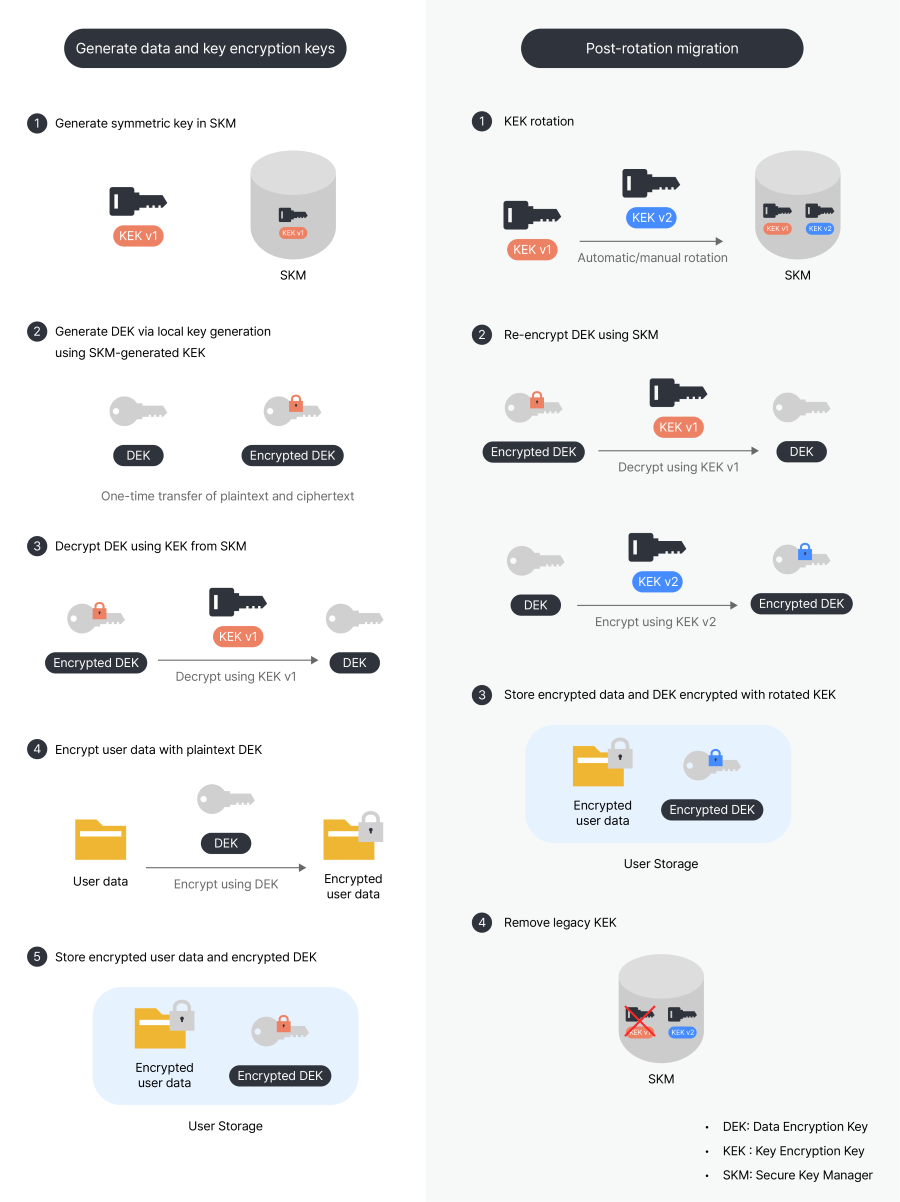
Caution
Calling the Secure Key Manager API directly for every request that requires a key can cause response delays. Use appropriate caching to optimize performance.
Minimize the damage with a key splitting strategy
If you encrypt all your data with a single key, it is at risk if that key is leaked. To avoid this, you can use a key segmentation strategy to minimize the scope of damage.
1. The need for key segmentation
Problems with using a single key
[1 million total customer data]
↓
[Encrypted with a single DEK]
↓
In the event of a key compromise → Full exposure of 1 million records
When applying key splitting
[1 million customer data]
↓
[Use of multiple DEKs by region/period/customer class]
↓
If 1 DEK is breached, → only 100K cases are at risk (90% less damage)
2. Key Split Strategy Types
is. Time-based segmentation
This method uses different keys depending on when the data was generated.
How to implement.
- Generate symmetric keys in Secure Key Manager for each data generation point (year and month) and set up auto-rotation.
- Manage the key ID mapping information by point in time in your application (e.g.,
2026-01 → Key ID: abc123...,2026-02 → Key ID: def456...). - When encrypting data, perform envelope encryption with the key ID mapped to the current month and the current key version.
- Store the key ID and key version information used with the encrypted data (e.g.,
keyId: abc123..., version: 0). - At decryption time, use the stored key ID and version information to decrypt the data.
Note
Keys in Secure Key Manager are managed by key ID in UUID format and version starting from 0. When rotating keys, the version increases from 0 → 1 → 2, so your application must record which version it encrypted with.
Advantages
- Key leakage only affects data for that time period
- Older data can be completely destroyed by key deletion
- Regulatory compliance: Data can be cryptographically destroyed by key deletion at the end of its retention period
Examples
January 2026 data: Key ID abc123... (100K entries)
February 2026 data: Key ID def456... (100K entries)
March 2026 data: Key ID ghi789... (100K entries)

→ January key (abc123...) leaked: Only 100K January data affected
b. User group segmentation
This method uses different keys based on user attributes.
**How to implement
**Method 1: Hash-based partitioning
- Generate multiple symmetric keys (for example, 10) in Secure Key Manager.
Note
A hash function is a function that converts an input value into a unique value of fixed length. The same input value always produces the same result, allowing you to assign consistent keys per user.
- Convert the user ID to a hash function, and determine the key number by dividing the hash value by the number of keys and taking the remainder (for example, 0-9).
- Manage the key ID mapping information by key number in your application (for example,
0 → key ID: abc123...,1 → key ID: def456...). - Store key ID and key version information used with encrypted data.
- When decrypting, use the stored key ID and version information to decrypt the data.
**Method 2: Split by customer tier
- Generate symmetric keys in Secure Key Manager by customer tier (e.g., VIP, PREMIUM, STANDARD).
- Manage the key ID mapping information by customer tier in your application (e.g.,
VIP → Key ID: abc123...,PREMIUM → Key ID: def456...). - Store key ID and key version information used with encrypted data.
- When decrypting, use the stored key ID and version information to decrypt the data.
Advantages.
- Different security policies can be applied by user group
- If a specific user group key is leaked, other group data is safe
- Differentiate key rotation cycles by customer tier (VIP: 30 days, general: 90 days)
3. Key split operation scenario
Scenario: Split 1 million customer data into 10 keys.
Initial state
- 10 key IDs (abc123..., def456..., ghi789..., etc.), each holding 100K cases of data
- Manage each key independently

Incident
→ Key ID ghi789... Suspected Breach

Countermeasures
1. Key ID ghi789... Rotate immediately
2. Re-encrypt only 100K data encrypted with that key
3. The other 9 keys are unaffected

Results
✅ Impacted: 100K (10% of total)
✅ Re-encryption time: Approximately 1 hour (10 hours for full re-encryption → 90% reduction)
✅ Service impact: Minimal
4. Key Partitioning Considerations
A. Increased Management Complexity
As the number of partitioned keys grows, management becomes more complex.
How to Track Key Inventory
- Use the Secure Key Manager API to retrieve a list of all currently active keys.
- Group them based on the application's key mapping table (e.g., by time, service, or customer tier).
- Query the database to find the count of encrypted records for each Key ID.
- Regularly audit each key's creation date, next scheduled rotation, and usage volume.
B. Stale Key Cleanup Policy
A policy is required to retire unused keys. Identify keys older than a certain period; if no data remains encrypted with a specific key, flag it for deletion and perform periodic cleanup.
5. Tips for Choosing a Key Partitioning Strategy
If you are just starting, we recommend Time-based Partitioning (Monthly). As your service scales and data sensitivity increases, you can enhance security by additionally applying Hash-based Partitioning.
Setting Up Automatic Key Rotation
1. Enabling Auto-Rotation in the Console
Step-by-Step Configuration
- Select a Key Store in the Secure Key Manager console.
- Click the Key Management menu.
- Select the symmetric or asymmetric key you wish to rotate.
- Set the Auto-Rotation Period in the details pane.

2. How Auto-Rotation Works
- Automatically generates a new key version when the set period is reached.
- The existing Key ID is maintained while only the key version increments (0 → 1 → 2 ...).
- **The latest version is automatically set as the primary key and used for encryption.
- Previous key versions remain available for decryption purposes.
Caution
- Setting the rotation period to '0' disables automatic rotation.
- The minimum rotation period is 30 days.
Operating Manual Key Rotation
Beyond automatic rotation, immediate manual rotation is required in the following scenarios.
1. Scenarios Requiring Emergency Key Rotation
- Suspected KEK compromise.
- Suspected leak of DEK ciphertexts.
- Internal personnel changes (e.g., employee resignation).
- Discovery of security vulnerabilities.
- Detection of a system intrusion.
Caution
If a plaintext DEK is leaked at the memory or application level, key rotation alone is insufficient. Since data encrypted with the leaked plaintext key can still be decrypted, you must perform a full data re-encryption.
2. How to Execute Immediate Rotation
- Select the target key in the Key Store.
- Click Rotate Now in the Key Details pane.

- Verify the new version in the key version list after rotation is complete.

3. Monitoring Key Rotation via API
You can verify changes after a key rotation through the API.
curl -X GET \
  'https://api-keymanager.nhncloudservice.com/keymanager/v1.2/appkey/{appkey}/keystores/{keyStoreId}/keys/{keyId}' \
  -H 'X-TC-AUTHENTICATION-ID: {User Access Key ID}' \
  -H 'X-TC-AUTHENTICATION-SECRET: {Secret Access Key}'
Response Example
{
  "header": {
    "resultCode": 0,
    "resultMessage": "success",
    "isSuccessful": true
  },
  "body": {
    "keyId": "035a0ffa16a64bbf8171c4bdcea37bbf",
    ...Omitted...
    "currentKeyValueVersion": 2,
    "autoRotationPeriod": 0,
    "nextAutoRotationDate": null,
    ...Remainder Omitted...
  }
}
Cautions
Pre-rotation Checklist
If you are currently using a Secure Key Manager symmetric key for Direct Data Encryption, you must migrate to Envelope Encryption before applying key rotation.
If data was encrypted directly with a single key
User Data → Direct Encryption with Secure Key Manager Symmetric Key → Storage of Encrypted DataApplying key rotation in this state will lead to the following issues:
- The key version changes from 0 → 1.
- Existing data remains encrypted with the previous version, but the system attempts to decrypt it using the new version.
- Decryption fails for all existing data → Complete service outage.
Safe Implementation Methods
Method 1: Migration to Envelope Encryption (Recommended)
- Redesign the system architecture to support Envelope Encryption.
- Migrate existing data to the new structure.
- Apply key rotation once the migration is complete.
Method 2: Maintaining Current Structure (Not Recommended)
If you apply key rotation while maintaining single-key encryption, the following issues will occur:
- All data must be re-encrypted every time a key rotation occurs.
- For large datasets, re-encryption can take dozens of hours.
- Service downtime or performance degradation will occur during the re-encryption process.
Checklist
Please verify the following items before applying key rotation:
- Is the Envelope Encryption method currently in use?
- Are the Key ID and Key Version information stored alongside the data?
- Have you validated key rotation scenarios in a test environment?
- Have you confirmed that existing data decrypts correctly after a key rotation?
Caution
Before applying key rotation to a production environment, you must validate the entire scenario in a test environment. A single mistake can lead to a critical system failure.
Conclusion
To meet increasing security requirements, this guide has introduced two strategies for strengthening security using Secure Key Manager’s key rotation feature. Depending on your service environment and data characteristics, these can be applied as either mandatory or optional.
Recommended Approach
1. Envelope Encryption (Mandatory)
Envelope Encryption is the foundational pattern for key rotation. It makes rotation significantly easier compared to direct single-key encryption and eliminates the need to re-encrypt massive datasets. We strongly recommend implementing Envelope Encryption from the initial system design phase.
2. Key Partitioning (Optional)
Key partitioning is a strategy to take security to the next level. However, since it increases management complexity, it can be applied selectively based on service characteristics.
- Benefits: Enhanced protection for sensitive information such as PII (Personally Identifiable Information) or financial data; minimized blast radius in the event of a key leak.
- Considerations: Increased management complexity; requires robust key tracking and cleanup policies.
Expected Benefits
Properly utilizing Secure Key Manager’s key rotation feature provides the following benefits:
- Improved security posture without changing application code.
- Reduced operational overhead through automated key management.
- Compliance with security regulatory requirements.
- Minimized damage in the event of a security incident.
Key rotation is a continuous security process, not a one-time task. By selecting a strategy tailored to your service scale and security needs—and through regular reviews and improvements—you can steadily elevate your security standards.
References
Table of Contents
- Key Rotation Guide for Enhanced Security
- Glossary
- Why key rotation is necessary
- Create a Key Rotation Strategy
- Key Rotation in an Envelope Encryption Environment
- Minimize the damage with a key splitting strategy
- Setting Up Automatic Key Rotation
- Operating Manual Key Rotation
- Cautions
- Conclusion
- References