User Access Key
NHN Cloud > Public API User Guide > API Authentication Method > User Access Key
A User Access Key is an authentication key issued based on an NHN Cloud or IAM account. It is used in conjunction with a Secret Access Key to authenticate API requests. API requests can be authenticated on a per-user basis, allowing for granular access control. API calls are restricted based on the roles and permissions assigned to authenticated NHN Cloud or IAM accounts. Please note that authorization may not be supported depending on the API version.
Caution
- User Access Keys and Secret Access Keys use static, non-expiring authentication. If exposed, any API within the account's roles and permissions can be called without authorization.
- Keep keys secure and ensure they are not hard-coded or stored in public repositories. If a leak is suspected, the keys must be revoked and reissued immediately.
Issue a User Access Key
To use NHN Cloud APIs, you must first issue a User Access Key. User Access Keys can be issued in the API Security Settings of the NHN Cloud Console.
1) In the drop-down menu that appears when you hover over your account in the upper-right corner of the NHN Cloud console, click API Security Settings.
2) Click + Create User Access Key ID
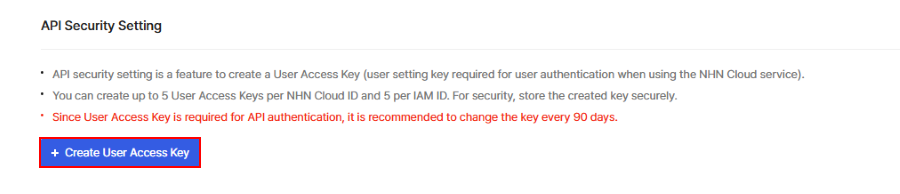
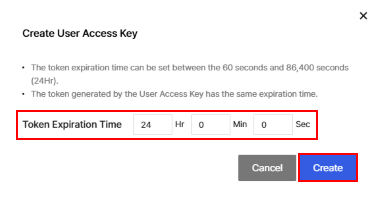
3) In the Create User Access Key modal window, set the Token Expiration Time, and then click Create.
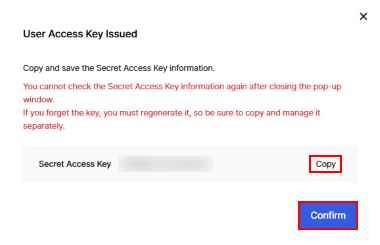
4) In the User Access Key Issued modal window, copy the Secret AccessKey, and then click OK.
Caution
- The Secret Access Key cannot be recovered or viewed once the modal window is closed. If lost, the key must be regenerated; please ensure you copy and store it in a secure location.
- If either the User Access Key or Secret Access Key is leaked or suspected to be compromised, you must immediately revoke the key and issue a new one.
Note
- Up to five User Access Keys can be issued per NHN Cloud or IAM account.
- It is recommended to rotate (change) your User Access Key ID every 90 days.
Making API Calls
User Access Key is passed via the HTTP request header. When calling an API, include the User Access Key in the header as shown in the example below.
- HTTP header format examples
X-TC-AUTHENTICATION-ID: {User Access Key}
X-TC-AUTHENTICATION-SECRET: {Secret Access Key}
When a user sends a request with a key in the HTTP header, the server validates the key and verified permissions before approving or denying the request.