Game > Gamebase > Android SDK User Guide > ETC
Additional Features
Additional functions provided by Gamebase are described as below:
Device Language
- Returns the language code from the device.
- If there are several languages registered, only the language of top priority is returned.
API
+ (String)Gamebase.getDeviceLanguageCode();
Display Language
Similar to the Maintenance popup, the language used by the device will be displayed as the Gamebase language.
However, there are games that may use a language different from the device language with separate options. For example, if the language configured for the device is English and you changed the game language to Japanese, the language displayed will be still English, even though you might want to see Japanese on the Gamebase screen.
For this, Gamebase provides a Display Language feature for applications that want to use a language that is not the language configured by the device for Gamebase.
Gamebase displays its messages in the language set in Display Language. The language code entered for Display Language should be one of the codes listed in the table (**Types of language codes supported by Gamebase) below:
[Caution]
- Use Display Language only when you want to change the language displayed in Gamebase to a language other than the one configured by the device.
- Display Language Code is a case-sensitive value in the form of ISO-639. There could be a problem if it is configured as a value such as 'EN' or 'zh-cn'.
- If the value entered for Display Language Code does not exist in the table below (Types of Language Codes Supported by Gamebase), Display Language Code is set to the default language set in the Gamebase console.
- If the language is not set in the Gamebase console, English (en) is set as the default language.
[Note]
- You can manually add a language set that is not included in the Gamebase client. See the Add New Language Sets section.
Types of Language Codes Supported by Gamebase
| Code | Name |
|---|---|
| de | German |
| en | English |
| es | Spanish |
| fi | Finnish |
| fr | French |
| id | Indonesian |
| it | Italian |
| ja | Japanese |
| ko | Korean |
| pt | Portuguese |
| ru | Russian |
| th | Thai |
| vi | Vietnamese |
| ms | Malay |
| zh-CN | Chinese-Simplified |
| zh-TW | Chinese-Traditional |
Each language code is defined in the DisplayLanguage class.
package com.toast.android.gamebase.base.ui;

public class DisplayLanguage {
    public static class Code {
        public static final String German              = "de";
        public static final String English             = "en";
        public static final String Spanish             = "es";
        public static final String Finnish             = "fi";
        public static final String French              = "fr";
        public static final String Indonesian          = "id";
        public static final String Italian             = "it";
        public static final String Japanese            = "ja";
        public static final String Korean              = "ko";
        public static final String Portuguese          = "pt";
        public static final String Russian             = "ru";
        public static final String Thai                = "th";
        public static final String Vietnamese          = "vi";
        public static final String Malay               = "ms";
        public static final String Chinese_Simplified  = "zh-CN";
        public static final String Chinese_Traditional = "zh-TW";
    }
    ...
}
Set Display Language with Gamebase Initialization
Display Language can be set when Gamebase is initialized.
API
+ (GamebaseConfiguration)GamebaseConfiguration.Builder.setDisplayLanguageCode(String displayLanguageCode);
Example
public class MainActivity extends AppCompatActivity {
    ...
    @Override
    protected void onCreate(Bundle savedInstanceState) {
        super.onCreate(savedInstanceState);
        String appId = "T0aStC1d";
        String appVersion = "1.0.0";
        GamebaseConfiguration configuration = new GamebaseConfiguration.Builder(appId, appVersion)
                                .enableLaunchingStatusPopup(true)
                                .setDisplayLanguageCode(DisplayLanguage.Code.English)
                                .build();

        Gamebase.initialize(activity, configuration, new GamebaseDataCallback<LaunchingInfo>() {
            @Override
            public void onCallback(final LaunchingInfo data, GamebaseException exception) {
                ...
            }
        });
        ...
    }
    ...
}
Set Display Language
You can change the initial setting of Display Language.
API
+ (void)Gamebase.setDisplayLanguageCode(String displayLanguageCode);
Example
public void setDisplayLanguageCodeToEnglishInRuntime() {
    Gamebase.setDisplayLanguageCode(DisplayLanguage.Code.English);
}
Get Display Language
You can retrieve the current application of Display Language.
API
+ (String)Gamebase.getDisplayLanguageCode();
Example
public void getDisplayLanguageCodeInRuntime() {
    String currentDisplayLanguageCode = Gamebase.getDisplayLanguageCode();
}
Add New Language Sets
To add a language other than the default language provided by Gamebase (ko, en, ja, zh-CN, zh-TW, th), you can add a localizedstring.json file to the res > raw folder of the project.
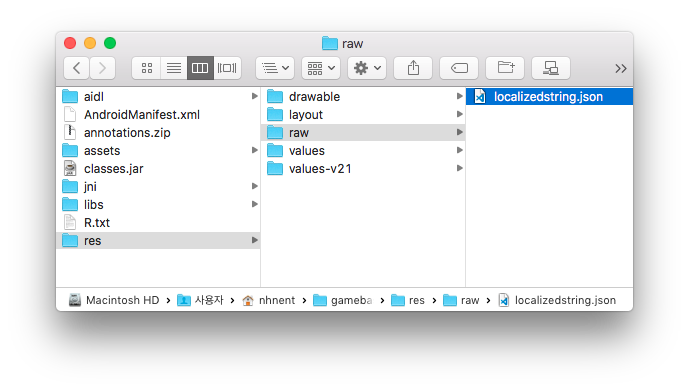
The localizedstring.json has a format defined as below:
{
  "en": {
    "common_ok_button": "OK",
    "common_cancel_button": "Cancel",
    ...
    "launching_service_closed_title": "Service Closed"
  },
  "ko": {
    "common_ok_button": "확인",
    "common_cancel_button": "취소",
    ...
    "launching_service_closed_title": "서비스 종료"
  },
  "ja": {
    "common_ok_button": "確認",
    "common_cancel_button": "キャンセル",
    ...
    "launching_service_closed_title": "サービス終了"
  },
    "zh-CN": {
    "common_ok_button": "确定",
    "common_cancel_button": "取消",
    ...
    "launching_service_closed_title": "关闭服务"
  },
  "zh-TW": {
    "common_ok_button": "好",
    "common_cancel_button": "取消",
    ...
    "launching_service_closed_title": "服務關閉"
  },
  "th": {
    "common_ok_button": "ยืนยัน",
    "common_cancel_button": "ยกเลิก",
    ...
    "launching_service_closed_title": "ปิดให้บริการ"
  },
  "de": {},
  "es": {},
  ...
  "ms": {}
}
If you need to add another language set, you can add a value in the form of "key":"value" to the corresponding language code in the localizedstring.json file.
{
  "en": {
    "common_ok_button": "OK",
    "common_cancel_button": "Cancel",
    ...
    "launching_service_closed_title": "Service Closed"
  },
    "vi": {
    "common_ok_button": "value",
    "common_cancel_button": "value",
    ...
   "launching_service_closed_title": "value"
  },
   ...
  "ms": {}
}
Priority in Display Language
If Display Language is set via initialization and SetDisplayLanguageCode API, the final application may be different from what has been entered.
- Check if the languageCode you enter is defined in the localizedstring.json file.
- If step 1 fails, check if the language code set in the device is defined in the localizedstring.json file during the initialization of Gamebase. (This value is maintained even if the language set in the device is changed after initialization.)
- If step 2 fails, the default language set in the Gamebase console is set as the Display Language.
- If there is no language set in the Gamebase console,
enis set as the default value.
Country Code
- Gamebase provides country codes for the system in the following APIs.
- Please select an appropriate API that best fits your purpose as each API has its own characteristics.
USIM Country Code
- Returns a country code written in the USIM.
- Even if a wrong country code has been written in the USIM, it will be returned as it is without any verification.
- 'ZZ' is returned when the value is empty.
API
+ (String)Gamebase.getCountryCodeOfUSIM()
Device Country Code
- Returns the country code received from the OS as it is without any verification.
- The country code of the device is automatically determined by the OS based on the "Language" setting.
- If there are several languages registered, the country code is determined based on the language of top priority.
- 'ZZ' is returned when the value is empty.
API
+ (String)Gamebase.getCountryCodeOfDevice()
Intergrated Country Code
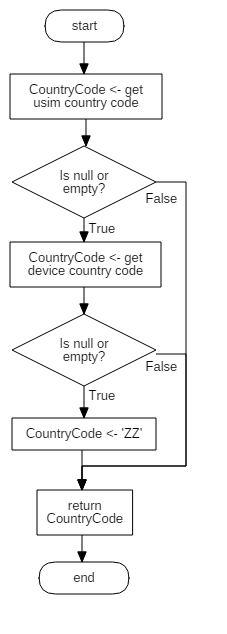
- Verifies and returns the country code in the order of the language setting in the USIM.
- getCountryCode API operates in the following order:
- Checks the country code written in the USIM. If a value exists, returns the value without any separate verification.
- If the country code in the USIM is empty, checks the country code of the device. If a value exists, returns the value without any separate verification.
- 'ZZ' is returned when the country code values of USIM and device are empty.
API
+ (String)Gamebase.getCountryCode()
Gamebase Event Handler
- Gamebase can process all kinds of events in a single event system called GamebaseEventHandler.
- GamebaseEventHandler can simply add or remove a Listener through the API below:
API
+ (void)Gamebase.addEventHandler(GamebaseEventHandler handler);
+ (void)Gamebase.removeEventHandler(GamebaseEventHandler handler);
+ (void)Gamebase.removeAllEventHandler();
VO
class GamebaseEventMessage {
    // Represents the type of an event.
    // The value of the GamebaseEventCategory class is assigned.
    @NonNull
    final public String category;

    // JSON String data that can be converted into a VO that is appropriate for each category.
    @Nullable
    final public String data;
}
Example
void eventHandlerSample(Activity activity) {
    Gamebase.addEventHandler(new GamebaseEventHandler() {
        @Override
        public void onReceive(@NonNull GamebaseEventMessage message) {
            switch (message.category) {
                case GamebaseEventCategory.LOGGED_OUT:
                    GamebaseEventLoggedOutData loggedOutData = GamebaseEventLoggedOutData.from(message.data);
                    if (loggedOutData != null) {
                        processLoggedOut(activity, message.category, loggedOutData);
                    }
                    break;
                case GamebaseEventCategory.SERVER_PUSH_APP_KICKOUT_MESSAGE_RECEIVED:
                case GamebaseEventCategory.SERVER_PUSH_APP_KICKOUT:
                case GamebaseEventCategory.SERVER_PUSH_TRANSFER_KICKOUT:
                    GamebaseEventServerPushData serverPushData = GamebaseEventServerPushData.from(message.data);
                    if (serverPushData != null) {
                        processServerPush(activity, message.category, serverPushData);
                    }
                    break;
                case GamebaseEventCategory.OBSERVER_LAUNCHING:
                case GamebaseEventCategory.OBSERVER_HEARTBEAT:
                case GamebaseEventCategory.OBSERVER_NETWORK:
                    GamebaseEventObserverData observerData = GamebaseEventObserverData.from(message.data);
                    if (observerData != null) {
                        processObserver(activity, message.category, observerData);
                    }
                    break;
                case GamebaseEventCategory.PURCHASE_UPDATED:
                    ...
                case GamebaseEventCategory.PUSH_RECEIVED_MESSAGE:
                    ...
                case GamebaseEventCategory.PUSH_CLICK_MESSAGE:
                    ...
                case GamebaseEventCategory.PUSH_CLICK_ACTION:
                    ...
                default:
                    ...
            }
        }
    });
}
- Category is defined in the GamebaseEventCategory class.
- In general, events can be categorized into LoggedOut, ServerPush, Observer, Purchase, or Push. GamebaseEventMessage.data can be converted into a VO in the ways shown in the following table for each Category.
| Event type | GamebaseEventCategory | VO conversion method | Remarks |
|---|---|---|---|
| LoggedOut | GamebaseEventCategory.LOGGED_OUT | GamebaseEventLoggedOutData.from(message.data) | - |
| ServerPush | GamebaseEventCategory.SERVER_PUSH_APP_KICKOUT_MESSAGE_RECEIVED GamebaseEventCategory.SERVER_PUSH_APP_KICKOUT GamebaseEventCategory.SERVER_PUSH_TRANSFER_KICKOUT |
GamebaseEventServerPushData.from(message.data) | - |
| Observer | GamebaseEventCategory.OBSERVER_LAUNCHING GamebaseEventCategory.OBSERVER_NETWORK GamebaseEventCategory.OBSERVER_HEARTBEAT |
GamebaseEventObserverData.from(message.data) | - |
| Purchase - Promotion payment | GamebaseEventCategory.PURCHASE_UPDATED | PurchasableReceipt.from(message.data) | - |
| Push - Message received | GamebaseEventCategory.PUSH_RECEIVED_MESSAGE | PushMessage.from(message.data) | Checks whether or not a message was received in the Foreground using the isForeground value. |
| Push - Message clicked | GamebaseEventCategory.PUSH_CLICK_MESSAGE | PushMessage.from(message.data) | The isForeground value does not exist. |
| Push - Action clicked | GamebaseEventCategory.PUSH_CLICK_ACTION | PushAction.from(message.data) | Operates when the RichMessage button is clicked. |
How to handle events when the application is not running
- By registering GamebaseEventHandler in your custom Application class, you can handle events even when the application is not running.
public class MyApplication extends Application {
    @Override
    public void onCreate() {
        super.onCreate();

        Gamebase.addEventHandler(new GamebaseEventHandler() {
            @Override
            public void onReceive(@NonNull GamebaseEventMessage message) {
                // ...
            }
        });

        // ...
    }
}
Logged Out
- This event occurs when the Gamebase Access Token has expired and a login function call is required to recover the network session.
Example
void eventHandlerSample(Activity activity) {
    Gamebase.addEventHandler(new GamebaseEventHandler() {
        @Override
        public void onReceive(@NonNull GamebaseEventMessage message) {
            switch (message.category) {
                case GamebaseEventCategory.LOGGED_OUT:
                    GamebaseEventLoggedOutData loggedOutData = GamebaseEventLoggedOutData.from(message.data);
                    if (loggedOutData != null) {
                        processLoggedOut(activity, message.category, loggedOutData);
                    }
                    break;
                default:
                    ...
            }
        }
    });
}

void processLoggedOut(String category, GamebaseEventLoggedOutData data) {
    if (category.equals(GamebaseEventCategory.LOGGED_OUT)) {
        // There was a problem with the access token.
        // Call login again.
        Gamebase.login(activity, Gamebase.getLastLoggedInProvider(), (authToken, exception) -> {});
    }
}
Server Push
- This is a message sent from the Gamebase server to the client's device.
- The Server Push Types supported from Gamebase are as follows:
- GamebaseEventCategory.SERVER_PUSH_APP_KICKOUT_MESSAGE_RECEIVED
- If you register a kickout ServerPush message in Operation > Kickout in the NHN Cloud Gamebase console, all clients connected to Gamebase will receive a kickout message.
- This event occurs immediately after receiving a server message from the client device.
- It can be used to pause the game when the game is running, as in the case of 'Auto Play'.
- GamebaseEventCategory.SERVER_PUSH_APP_KICKOUT
- If you register a kickout ServerPush message in Operation > Kickout of the NHN Cloud Gamebase Console, then all clients connected to Gamebase will receive the kickout message.
- A pop-up is displayed when the client device receives a server message. This event occurs when the user closes this pop-up.
- GamebaseEventCategory.SERVER_PUSH_TRANSFER_KICKOUT
- If the guest account is successfully transferred to another device, the previous device receives a kickout message.
- GamebaseEventCategory.SERVER_PUSH_APP_KICKOUT_MESSAGE_RECEIVED
Example
void eventHandlerSample(Activity activity) {
    Gamebase.addEventHandler(new GamebaseEventHandler() {
        @Override
        public void onReceive(@NonNull GamebaseEventMessage message) {
            switch (message.category) {
                case GamebaseEventCategory.SERVER_PUSH_APP_KICKOUT_MESSAGE_RECEIVED:
                case GamebaseEventCategory.SERVER_PUSH_APP_KICKOUT:
                case GamebaseEventCategory.SERVER_PUSH_TRANSFER_KICKOUT:
                    GamebaseEventServerPushData serverPushData = GamebaseEventServerPushData.from(message.data);
                    if (serverPushData != null) {
                        processServerPush(activity, message.category, serverPushData);
                    }
                    break;
                default:
                    ...
            }
        }
    });
}

void processServerPush(String category, GamebaseEventServerPushData data) {
    if (category.equals(GamebaseEventCategory.SERVER_PUSH_APP_KICKOUT_MESSAGE_RECEIVED)) {
        // Currently, the kickout pop-up is displayed.
        // If your game is running, stop it.
    } else if (category.equals(GamebaseEventCategory.SERVER_PUSH_APP_KICKOUT)) {
        // Kicked out from Gamebase server.(Maintenance, banned or etc..)
        // And the game user closes the kickout pop-up.
        // Return to title and initialize Gamebase again.
    } else if (category.equals(GamebaseEventCategory.SERVER_PUSH_TRANSFER_KICKOUT)) {
        // If the user wants to move the guest account to another device,
        // if the account transfer is successful,
        // the login of the previous device is released,
        // so go back to the title and try to log in again.
    }
}
Observer
- It is a system used to handle many different status-changing events in Gamebase.
- The Observer Types supported by Gamebase are as follows:
- GamebaseEventCategory.OBSERVER_LAUNCHING
- It operates when the Launching status is changed, for instance when the server is under maintenance, or the maintenance is over, or a new version is deployed and update is required.
- GamebaseEventObserverData.code: Indicates the LaunchingStatus value.
- LaunchingStatus.IN_SERVICE: 200
- LaunchingStatus.RECOMMEND_UPDATE: 201
- LaunchingStatus.IN_SERVICE_BY_QA_WHITE_LIST: 202
- LaunchingStatus.IN_TEST: 203
- LaunchingStatus.IN_REVIEW: 204
- LaunchingStatus.IN_BETA: 205
- LaunchingStatus.REQUIRE_UPDATE: 300
- LaunchingStatus.BLOCKED_USER: 301
- LaunchingStatus.TERMINATED_SERVICE: 302
- LaunchingStatus.INSPECTING_SERVICE: 303
- LaunchingStatus.INSPECTING_ALL_SERVICES: 304
- LaunchingStatus.INTERNAL_SERVER_ERROR: 500
- GamebaseEventCategory.OBSERVER_HEARTBEAT
- Operates when the status of a user account changes, for instance when the user account is deleted or banned.
- GamebaseEventObserverData.code: Indicates the GamebaseError value.
- GamebaseError.INVALID_MEMBER: 6
- GamebaseError.BANNED_MEMBER: 7
- GamebaseEventCategory.OBSERVER_NETWORK
- Can receive the information about the changes in the network.
- Operates when the network is disconnected or connected, or switched from Wi-Fi to a cellular network.
- GamebaseEventObserverData.code: Indicates the NetworkManager value.
- NetworkManager.TYPE_NOT: -1
- NetworkManager.TYPE_MOBILE: 0
- NetworkManager.TYPE_WIFI: 1
- NetworkManager.TYPE_ANY: 2
- GamebaseEventCategory.OBSERVER_LAUNCHING
VO
class GamebaseEventObserverData {
    // This information represents the status value.
    public int code;

    // This information shows the message about status.
    @Nullable
    public String message;

    // A reserved field for additional information.
    @Nullable
    public String extras;
}
Example
void eventHandlerSample(Activity activity) {
    Gamebase.addEventHandler(new GamebaseEventHandler() {
        @Override
        public void onReceive(@NonNull GamebaseEventMessage message) {
            switch (message.category) {
                case GamebaseEventCategory.OBSERVER_LAUNCHING:
                case GamebaseEventCategory.OBSERVER_HEARTBEAT:
                case GamebaseEventCategory.OBSERVER_NETWORK:
                    GamebaseEventObserverData observerData = GamebaseEventObserverData.from(message.data);
                    if (observerData != null) {
                        processObserver(activity, message.category, observerData);
                    }
                    break;
                default:
                    ...
            }
        }
    });
}

void processObserver(String category, GamebaseEventObserverData data) {
    if (category.equals(GamebaseEventCategory.OBSERVER_LAUNCHING)) {
        int launchingStatusCode = data.code;
        String launchingMessage = data.message;
        switch (launchingStatusCode) {
            case LaunchingStatus.IN_SERVICE:
                // Finished maintenance.
                break;
            case LaunchingStatus.INSPECTING_SERVICE:
            case LaunchingStatus.INSPECTING_ALL_SERVICES:
                // Under maintenance.
                break;
            ...
        }
    } else if (category.equals(GamebaseEventCategory.OBSERVER_HEARTBEAT)) {
        int errorCode = data.code;
        switch (errorCode) {
            case GamebaseError.INVALID_MEMBER:
                // You can check the invalid user session in here.
                // ex) After transferred account to another device.
                break;
            case GamebaseError.BANNED_MEMBER:
                // You can check the banned user session in here.
                break;
            case GamebaseError.AUTH_TOKEN_LOGIN_INVALID_TOKEN_INFO:
                // There was a problem with the access token.
                // Call login again.
                Gamebase.login(activity, Gamebase.getLastLoggedInProvider(), (authToken, exception) -> {});
                break;
        }
    } else if (category.equals(GamebaseEventCategory.OBSERVER_NETWORK)) {
        int networkTypeCode = data.code;
        // You can check the changed network status in here.
        if (networkTypeCode == NetworkManager.TYPE_NOT) {
            // Network disconnected.
        } else {
            // Network connected.
        }
    }
}
Purchase Updated
- This event is triggered when a product is acquired by redeeming a promotion code.
- Can acquire payment receipt information.
Example
void eventHandlerSample(Activity activity) {
    Gamebase.addEventHandler(new GamebaseEventHandler() {
        @Override
        public void onReceive(@NonNull GamebaseEventMessage message) {
            switch (message.category) {
                case GamebaseEventCategory.PURCHASE_UPDATED:
                    PurchasableReceipt receipt = PurchasableReceipt.from(message.data);
                    if (receipt != null) {
                        // If the user got item by 'Promotion Code',
                        // this event will be occurred.
                    }
                    break;
                default:
                    ...
            }
        }
    });
}
Push Received Message
- This event is triggered when a push message is received.
- Can determine whether the message is received in the foreground through the isForeground field or in the background.
- You can also acquire custom information that was sent along with push by converting the extras field to JSON.
VO
class PushMessage {
    // The unique ID of a message.
    @NonNull
    public String id;

    // The title of the push message.
    @Nullable
    public String title;

    // The body of the push message.
    @Nullable
    public String body;

    // You can check all information by converting them to JSONObject.
    @NonNull
    public String extras;
}
Example
void eventHandlerSample(Activity activity) {
    Gamebase.addEventHandler(new GamebaseEventHandler() {
        @Override
        public void onReceive(@NonNull GamebaseEventMessage message) {
            switch (message.category) {
                case GamebaseEventCategory.PUSH_RECEIVED_MESSAGE:
                    PushMessage pushMessage = PushMessage.from(message.data);
                    if (pushMessage != null) {
                        // When you received push message.
                        try {
                            JSONObject json = new JSONObject(pushMessage.extras);
                            // There is 'isForeground' information.
                            boolean isForeground = json.getBoolean("isForeground");
                            Object customValue = json.get("YourCustomKey");
                        } catch (Exception e) {}
                    }
                    break;
                default:
                    ...
            }
        }
    });
}
Push Click Message
- This event is triggered when a received message is clicked.
- Unlike GamebaseEventCategory.PUSH_RECEIVED_MESSAGE, there is no isForeground field.
Example
void eventHandlerSample(Activity activity) {
    Gamebase.addEventHandler(new GamebaseEventHandler() {
        @Override
        public void onReceive(@NonNull GamebaseEventMessage message) {
            switch (message.category) {
                case GamebaseEventCategory.PUSH_CLICK_MESSAGE:
                    PushMessage clickedMessage = PushMessage.from(message.data);
                    if (clickedMessage != null) {
                        // When you clicked push message.
                    }
                    break;
                default:
                    ...
            }
        }
    });
}
Push Click Action
- This event is triggered when the button created by the Rich Message feature is clicked.
- actionType provides the following:
- "OPEN_APP"
- "OPEN_URL"
- "REPLY"
- "DISMISS"
VO
class PushAction {
    // Button action type.
    @NonNull
    public String actionType;

    // PushMessage data.
    @NonNull
    public PushMessage message;

    // User text typed in Push console.
    @Nullable
    public String userText;
}
Example
void eventHandlerSample(Activity activity) {
    Gamebase.addEventHandler(new GamebaseEventHandler() {
        @Override
        public void onReceive(@NonNull GamebaseEventMessage message) {
            switch (message.category) {
                case GamebaseEventCategory.PUSH_CLICK_ACTION:
                    PushAction pushAction = PushAction.from(message.data);
                    if (pushAction != null) {
                        // When you clicked action button by 'Rich Message'.
                    }
                    break;
                default:
                    ...
            }
        }
    });
}
Analytics
The game index can be transferred to the Gamebase server.
[Caution]
All APIs supported by the Gamebase Analytics can be called after login.
[TIP]
When the Gamebase.Purchase.requestPurchase() API is called and payment is completed, an index is automatically transferred.
Game User Data Settings
The user level information can be set after login to the game has been made.
[Caution]
If the setGameUserData API is not called after login to the game, the level information may be missed from other indexes.
Parameters required for calling the API are as follows:
GameUserData
| Name | Mandatory (M) / Optional (O) | type | Desc |
|---|---|---|---|
| userLevel | M | int | Describes the level of game user. |
| channelId | O | String | Describes the channel. |
| characterId | O | String | Describes the name of character. |
| classId | O | String | Shows the occupation. |
API
Gamebase.Analytics.setGameUserData(GameUserData gameUserData);
Example
public void onLoginSuccess() {
    int userLevel = 10;
    String channelId, characterId, classId;

    GameUserData gameUserData = new GameUserData(userLevel);
    gameUserData.channelId = channelId; // Optional
    gameUserData.characterId = characterId; // Optional
    gameUserData.classId = classId; // Optional

    Gamebase.Analytics.setGameUserData(gameUserData);
}
Level Up Trace
User level information can be changed after leveling up.
Parameters required for calling the API are as follows:
LevelUpData
| Name | Mandatory (M) / Optional (O) | type | Desc |
|---|---|---|---|
| userLevel | M | int | Describes the level of user. |
| levelUpTime | M | long | Enter Epoch Timein millisecond. |
API
Gamebase.Analytics.traceLevelUp(LevelUpData levelUpData);
Example
public void onLevelUp(int userLevel, long levelUpTime) {
    LevelUpData levelUpData = new LevelUpData(userLevel, levelUpTime);

    Gamebase.Analytics.traceLevelUp(levelUpData);
}
Contact
Gamebase provides features to respond to customer inquiries.
[TIP]
By integrating with NHN Cloud Contact, customer inquiries can be handled more at ease and convenience. For more details on NHN Cloud Contact, see the guide as below: NHN Cloud Online Contact Guide
[Caution]
- For Gamebase Android SDK 2.53.0 and later versions, you only need to add permission declaration to the AndroidManifest.xml by following the guide below, and Gamebase Android SDK will automatically request permissions when attaching files to the Customer Center.
- For Gamebase Android SDK 2.52.0 and earlier versions, you must implement permission handling according to the relevant platform guide.
Customer Service Type
In the Gamebase Console > App > InApp URL > Service Center, you can choose from three different types of Customer Centers.
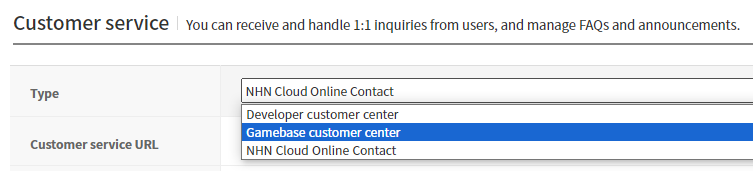
| Customer Service Type | Required Login |
|---|---|
| Developer customer center | X |
| Gamebase customer center | △ |
| NHN Cloud Online Contact | △ |
Gamebase SDK's Customer Center API uses the following URLs based on the type:
- Developer's Customer Center
- URL specified in the Customer Center URL field.
- Gamebase's Customer Center
- Before login: Customer Center URL without user information.
- After login: Customer Center URL with user information.
- NHN Cloud organization product (Online Contact)
- Before login: Customer Center URL without user information.
- After login: Customer Center URL with user information.
Open Contact WebView
Displays the Customer Center WebView. URL is determined by the customer center type. You can pass the additional information to the URL using ContactConfiguration.
ContactConfiguration
| API | Mandatory(M) / Optional(O) | Description |
|---|---|---|
| newBuilder() | M | ContactConfiguration object can be created with the newBuilder() function. |
| build() | M | Converts the configured builder into a Configuration object. |
| setUserName(String userName) | O | Used to pass the user name (nickname). It is a field used for the NHN Cloud organization product (Online Contact) type. default: null |
| setAdditionalURL(String additionalURL) | O | Additional URL appended to the developer's own customer center URL. Use it only if the customer center type is CUSTOM.default: null |
| setAdditionalParameters(Map<String, String> additionalParameters) | O | Additional parameters appended to the contact center URL. default: null |
| setExtraData(Map<String, Object> extraData) | O | Passes the extra data wanted by the developer at the opening of the customer center. default: EmptyMap |
API
+ (void)Gamebase.Contact.openContact(@NonNull  final Activity activity,
                                     @Nullable final GamebaseCallback onCloseCallback);

+ (void)Gamebase.Contact.openContact(@NonNull  final Activity activity,
                                     @NonNull  final ContactConfiguration configuration,
                                     @Nullable final GamebaseCallback onCloseCallback);
ErrorCode
| Error Code | Description |
|---|---|
| NOT_INITIALIZED(1) | Gamebase.initialize has not been called. |
| UI_CONTACT_FAIL_INVALID_URL(6911) | The Customer Center URL does not exist. Check the Customer Center URL of the Gamebase Console. |
| UI_CONTACT_FAIL_ISSUE_SHORT_TERM_TICKET(6912) | Failed to issue a temporary ticket for user identification. |
| UI_CONTACT_FAIL_ANDROID_DUPLICATED_VIEW(6913) | The Customer Center WebView is already being displayed. |
Example
Gamebase.Contact.openContact(activity, new GamebaseCallback() {
    @Override
    public void onCallback(GamebaseException exception) {
        if (Gamebase.isSuccess(exception)) {
            // A user close the contact web view.
        } else if (exception.code == UI_CONTACT_FAIL_INVALID_URL) { // 6911
            // TODO: Gamebase Console Service Center URL is invalid.
            // Please check the url field in the TOAST Gamebase Console.
        } else if (exception.code == UI_CONTACT_FAIL_ANDROID_DUPLICATED_VIEW) { // 6913
            // The customer center web view is already opened.
        } else {
            // An error occur when opening the contact web view.
        }
    }
});
Request Contact URL
Returns the URL used for displaying the Customer Center WebView.
API
+ (void)Gamebase.Contact.requestContactURL(@NonNull final GamebaseDataCallback<String> callback);

+ (void)Gamebase.Contact.requestContactURL(@NonNull final ContactConfiguration configuration,
                                           @NonNull final GamebaseDataCallback<String> callback);
ErrorCode
| Error Code | Description |
|---|---|
| NOT_INITIALIZED(1) | Gamebase.initialize has not been called. |
| UI_CONTACT_FAIL_INVALID_URL(6911) | The Customer Center URL does not exist. Check the Customer Center URL of the Gamebase Console. |
| UI_CONTACT_FAIL_ISSUE_SHORT_TERM_TICKET(6912) | Failed to issue a temporary ticket for user identification. |
Example
ContactConfiguration configuration = ContactConfiguration.newBuilder()
        .setUserName(userName)
        .build();
Gamebase.Contact.requestContactURL(configuration, new GamebaseDataCallback<String>() {
    @Override
    public void onCallback(String contactUrl, GamebaseException exception) {
        if (Gamebase.isSuccess(exception)) {
            // Open webview with 'contactUrl'
        } else if (exception.code == UI_CONTACT_FAIL_INVALID_URL) { // 6911
            // TODO: Gamebase Console Service Center URL is invalid.
            // Please check the url field in the TOAST Gamebase Console.
        } else {
            // An error occur when requesting the contact web view url.
        }
    }
});
File Attach Type Popup
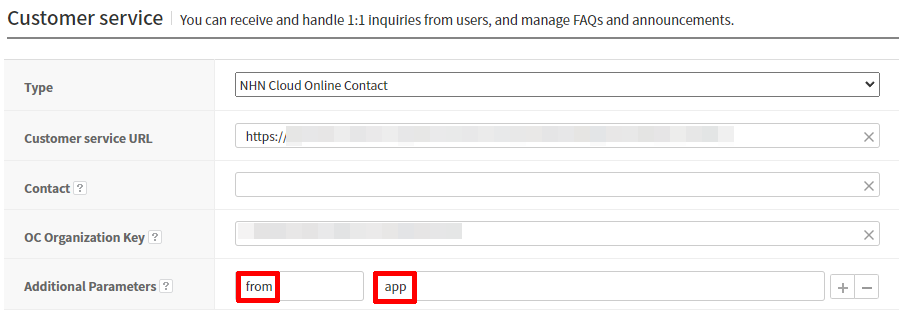
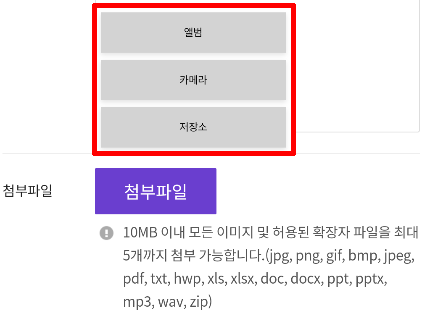
If the customer center type is 'NHN Cloud Organization Product', enter from for Key and app for Value in the 'Additional parameters' item, and the pop-up for selecting the type when attaching a file will be displayed.